
Hello Developers, Welcome to Jetpack Compose tutorials. In this tutorial, We are going to learn How to do Bold Italic Underline in Jetpack Compose Using Kotlin with Android Studio.
Page Contents
Bold, Italic & Underline Text in Jetpack Compose
First,
- Open Android Studio
- Create a new or open existing project
- Setup Project
build.gradle (project)
buildscript {
    ext {
        compose_ui_version = '1.4.0'
    }
}

// Top-level build file where you can add configuration options common to all sub-projects/modules.

plugins {
    id 'com.android.application' version '7.4.2' apply false
    id 'com.android.library' version '7.4.2' apply false
    id 'org.jetbrains.kotlin.android' version '1.8.10' apply false
}
build.gradle (module:app)
plugins {
    id 'com.android.application'
    id 'org.jetbrains.kotlin.android'
}

android {
    namespace 'com.techpassmaster.jetpackcomposeseries'
    compileSdk 33

    defaultConfig {
        applicationId "com.techpassmaster.jetpackcomposeseries"
        minSdk 24
        targetSdk 33
        versionCode 1
        versionName "1.0"

        testInstrumentationRunner "androidx.test.runner.AndroidJUnitRunner"
        vectorDrawables {
            useSupportLibrary true
        }
    }

    buildTypes {
        release {
            minifyEnabled false
            proguardFiles getDefaultProguardFile('proguard-android-optimize.txt'), 'proguard-rules.pro'
        }
    }
    compileOptions {
        sourceCompatibility JavaVersion.VERSION_1_8
        targetCompatibility JavaVersion.VERSION_1_8
    }

    kotlinOptions {
        jvmTarget = '1.8'
    }
    buildFeatures {
        compose true
    }
    composeOptions {
        kotlinCompilerExtensionVersion '1.4.4'
    }
    packagingOptions {
        resources {
            excludes += '/META-INF/{AL2.0,LGPL2.1}'
        }
    }
}

dependencies {

    implementation 'androidx.core:core-ktx:1.10.0'
    implementation 'androidx.lifecycle:lifecycle-runtime-ktx:2.6.1'
    implementation 'androidx.activity:activity-compose:1.7.0'
    implementation "androidx.compose.ui:ui:$compose_ui_version"
    implementation "androidx.compose.ui:ui-tooling-preview:$compose_ui_version"
    implementation 'androidx.compose.material:material:1.4.1'
    implementation 'androidx.appcompat:appcompat:1.6.1'
    testImplementation 'junit:junit:4.13.2'
    androidTestImplementation 'androidx.test.ext:junit:1.1.5'
    androidTestImplementation 'androidx.test.espresso:espresso-core:3.5.1'
    androidTestImplementation "androidx.compose.ui:ui-test-junit4:$compose_ui_version"
    debugImplementation "androidx.compose.ui:ui-tooling:$compose_ui_version"
    debugImplementation "androidx.compose.ui:ui-test-manifest:$compose_ui_version"
    implementation "org.jetbrains.kotlin:kotlin-script-runtime:1.8.20"
}
After creating the project create 3 composable functions for BoldText, ItalicText, and UnderlineText.
BoldText @Composable Function
@Composable
fun BoldText() {
        Text(
            text = "Hello World",
            fontWeight = FontWeight.Bold,
            fontSize = 30.sp
        )
}
ItalicText @Composable Function
@Composable
fun ItalicText() {
        Text(
            text = "Hello World",
            fontStyle = FontStyle.Italic,
            fontSize = 30.sp
        )
}
UnderlineText @Composable Function
@Composable
fun UnderlineText() {
        Text(
            text = "Text with UnderLine",
            textDecoration = TextDecoration.Underline,
            fontSize = 30.sp
        )
}
Complete code
package com.techpassmaster.jetpackcomposeseries

import android.os.Bundle
import androidx.activity.ComponentActivity
import androidx.activity.compose.setContent
import androidx.compose.foundation.layout.Column
import androidx.compose.foundation.layout.fillMaxSize
import androidx.compose.material.MaterialTheme
import androidx.compose.material.Surface
import androidx.compose.runtime.Composable
import androidx.compose.material.*
import androidx.compose.ui.Modifier
import androidx.compose.ui.text.font.FontStyle
import androidx.compose.ui.text.font.FontWeight
import androidx.compose.ui.text.style.TextDecoration
import androidx.compose.ui.unit.sp
import com.techpassmaster.jetpackcomposeseries.ui.theme.JetpackComposeSeriesTheme

class BoldItalicUnderlineActivity : ComponentActivity() {
    override fun onCreate(savedInstanceState: Bundle?) {
        super.onCreate(savedInstanceState)
        setContent {
            JetpackComposeSeriesTheme {
                // A surface container using the 'background' color from the theme
                Surface(
                    modifier = Modifier.fillMaxSize(),
                    color = MaterialTheme.colors.background
                ) {

//                  call BoldItalicUnderline composable function here
                    BoldItalicUnderLineText()
                }
            }
        }
    }
}

@Composable
fun BoldItalicUnderLineText() {

//        Here we are using Column for displaying a collection of composable
//        in a vertically sequenced format It's similar to a LinearLayout with
//        vertical orientation.

    Column {

        // Bold Text
        Text(
            text = "Hello World",
            fontWeight = FontWeight.Bold,
            fontSize = 30.sp
        )

        // Italic Text
        Text(
            text = "Hello World",
            fontStyle = FontStyle.Italic,
            fontSize = 30.sp
        )

        // UnderLine Text
        Text(
            text = "Text with UnderLine",
            textDecoration = TextDecoration.Underline,
            fontSize = 30.sp
        )
    }
}
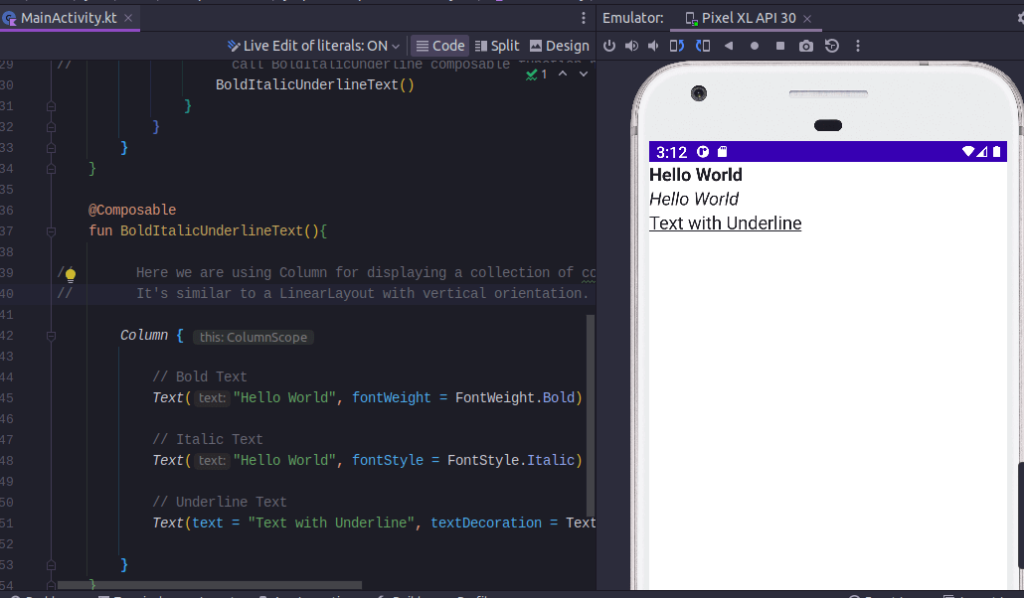
In the above example, we’re using Column for displaying a collection of composable in a vertically sequenced format It’s similar to a LinearLayout with vertical orientation.
Output
You May Also Like ⇣
- Text in Jetpack Compose
- Text Padding in Jetpack Compose
- Clickable Text in Jetpack Compose
- Shapes in Jetpack Compose
